

Tracking Referrals, Checking Wallet Ledger & Redeeming Coins
Monitor referred signups in real time, distinguish PENDING from REWARDED status, audit your Karo Coin Wallet ledger, and redeem your rewards.
#Tracking Your Referral Funnel at a Glance
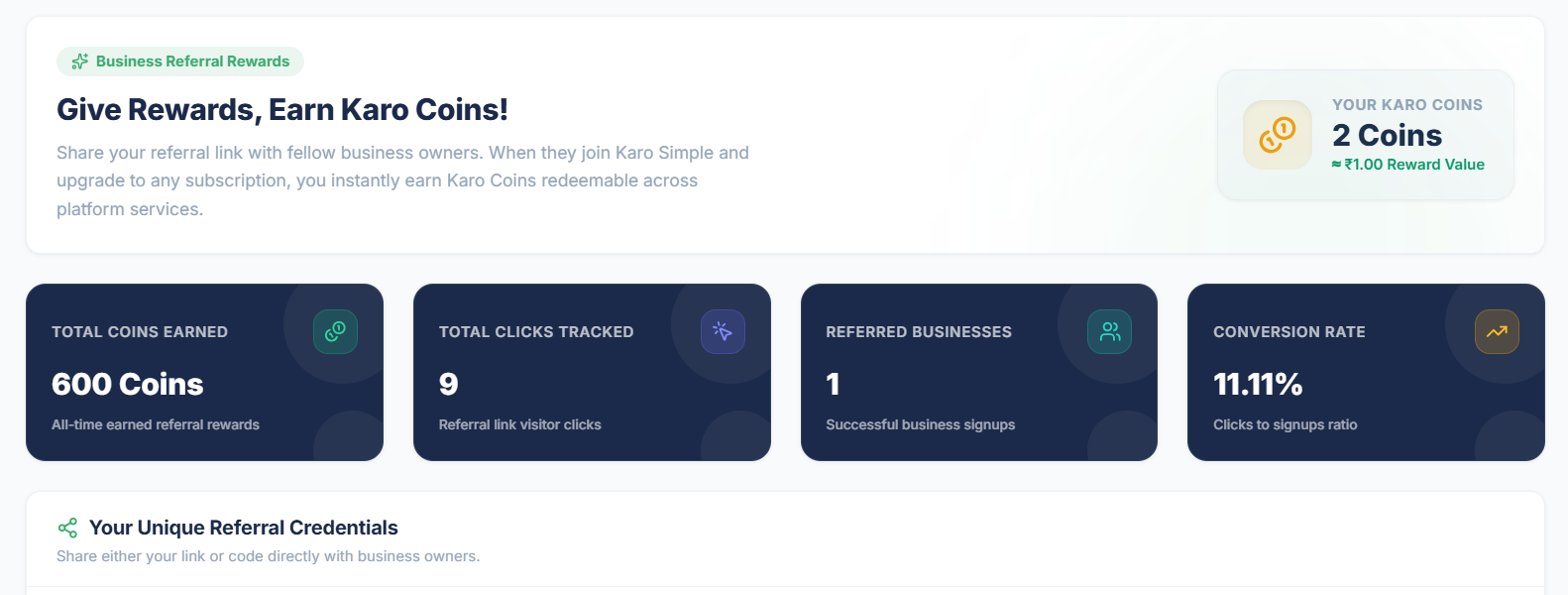
At the top of your activated Refer & Earn dashboard, 4 key performance cards keep you informed about your outreach progress:
- Total Coins Earned: Your all-time cumulative earnings since joining the program, including coins you have already redeemed.
- Total Clicks Tracked: How many times people tapped on your unique referral link across WhatsApp, social media, or email.
- Referred Businesses: The count of businesses that completed registration and purchased an active plan through you.
- Conversion Rate (%): The percentage of link clickers who signed up (for instance: 50 clicks resulting in 5 signups = 10% conversion rate).
#The "Your Referred Businesses" Table
Located directly below your sharing link, this table lists every single business account that joined through your referral:
- Date: When the business joined.
- Referred Business: The registered store name (e.g. "Ramesh Dental Clinic").
- Plan Purchased: The subscription tier chosen (e.g. "Pro - Yearly").
- Coins Awarded: The number of coins attributed to this referral.
- Status: PENDING (yellow badge, within 15-day verification period) or REWARDED (green badge, credited to your wallet).
When Does a Referral First Appear in Your Table?
A referred business appears in your table as soon as they complete their business profile setup (not just when clicking your link). If a friend registered an account but has not entered their business name yet, their row will not show up until they finish that step. If you do not see them, press F5 (or Ctrl + F5 / Cmd + Shift + R) to reload the newest data.

#Your Karo Coin Wallet History (The Ledger)
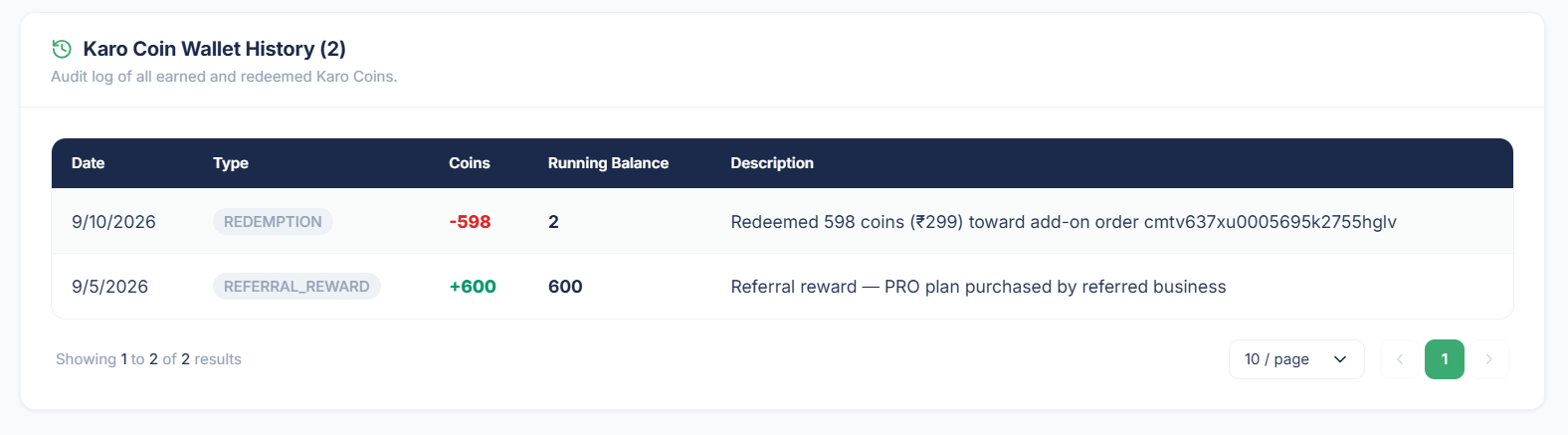
Transparency is crucial when handling rewards. The Karo Coin Wallet History section acts as an immutable financial ledger tracking every coin entering or leaving your balance:
- Transaction Date: The exact timestamp when coins were credited or debited.
- Type: E.g. REFERRAL_REWARD when earning from a signup.
- Coins Added / Deducted: Positive credits highlighted in green (e.g. +1,600).
- Running Balance: Your cumulative spendable balance immediately after that transaction.
- Description: Clear context (e.g. "Referral reward for Ramesh Dental Clinic").
#How to Redeem Your Karo Coins
Once your active wallet balance crosses the 500-coin threshold (minimum ₹250 value), you can redeem your coins:
Check Your Spendable Balance
Verify that your wallet shows at least 500 REWARDED coins.
Redemption Method
When a business owner clicks “Purchase” or “Upgrade”, they are redirected to the payment page. On this page, there is an option to “Use Coins”.
High-ROI Referral Strategy: Local Trader Groups
The fastest way to earn thousands of coins is sharing your referral link inside local merchant WhatsApp groups, rotary clubs, or trade associations. Highlighting how Karo Simple protects businesses from unfair 1-star reviews resonates instantly with fellow business owners!
#Frequently Asked Questions
Was this guide helpful?
Help us keep our documentation accurate and easy to follow.
Getting Started with Refer & Earn: One-Time Partner Activation
Activate your partner program by accepting the 4 agreements, generate your unique referral link and short code, and learn how Karo Coins work.
Karo Coin Rewards: Payout Tiers, 15-Day Holding Period & Calculations
Understand the complete referral earnings matrix across Starter and Pro plans, billing cycles, the 15-day verification period, and payout math.