

Direct Customer Outreach: Calling Unhappy Customers & Tracing Sources
Learn how to use one-click phone dialing from your mobile device, understand masked phone privacy, and trace complaints to specific staff members.
#Why Direct Outreach Converts Angry Customers into Loyal Fans
When customers complain online, they often do so because they felt ignored in person. A email apology feels cold and corporate. But when the store owner or manager personally picks up the phone to listen, apologize, and make things right, the customer is blown away.
Karo Simple is built to facilitate this personal touch immediately from your mobile phone or tablet.
#Using the One-Click Mobile Call Button
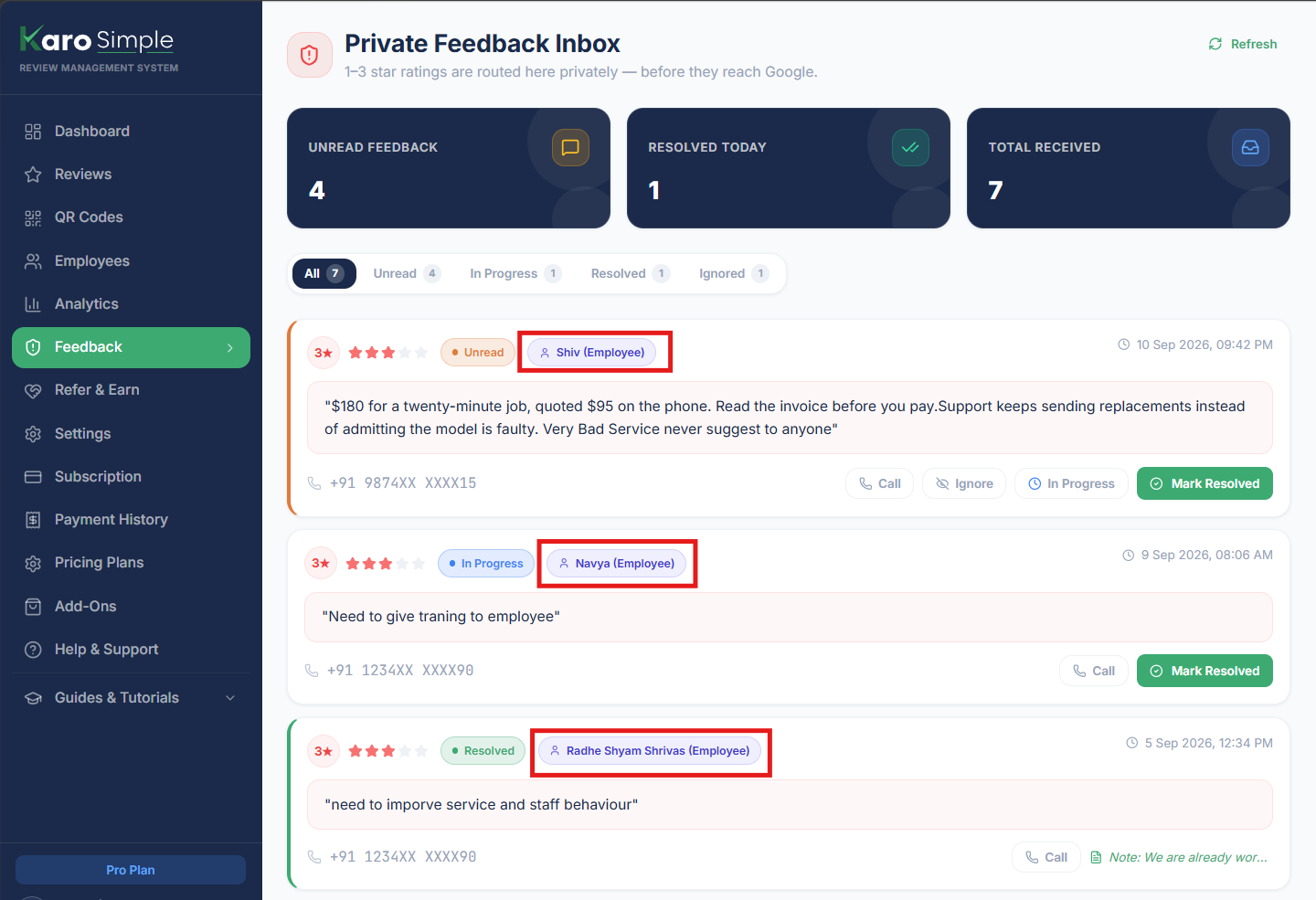
Every feedback entry displays a green Call button with a phone icon directly beside the customer's contact information:
Open the Feedback Inbox on Your Mobile Device
For the best experience, open Karo Simple on your smartphone browser (Chrome or Safari). Navigate to the Feedback section.
Tap the Green "Call" Icon
Locate the customer entry and tap the green Call icon next to their phone number.
Instant Smartphone Dialing
Your phone's native dialer will launch automatically with the customer's complete number dialed and ready to call. You never have to copy, paste, or memorize digits.
Real-World Example
A diner leaves feedback stating: "Ordered paneer tikka for takeaway, arrived cold and missing mint chutney." You tap the Call icon from your phone, apologize for the kitchen rush, and send a replacement meal or offer a credit on their next bill. The customer feels valued and tells their friends how great your customer care is.
#Understanding Masked Phone Numbers and Privacy
On your dashboard screen, customer phone numbers are masked with asterisks (for example: 98****2345):
- Screen Privacy: Numbers are masked so that curious onlookers, junior floor staff, or nearby customers cannot glance at your screen and copy private customer phone numbers.
- Dialing Accuracy: Behind the scenes, the complete phone number is securely embedded into the Call button. When you tap Call on your mobile phone, the full, correct number connects seamlessly.
#Tracing Feedback with Source Attribution Badges
Every feedback entry contains a Source Badge that tells you precisely where the customer stood when they scanned the code:
- General Shop QR Code: Displays the physical location name (such as "Main Billing Counter", "Drive-Thru Window", or "Table 7"). This helps you pinpoint store-wide bottlenecks.
- Employee Personal QR Code: Displays the employee's name (such as "From: Priya's QR Code"). This allows you to hold the right team member accountable.
Real-World Staff Coaching Example
A feedback entry states: "Stylist was rude and rushed through my haircut" with the badge "From: Priya's QR Code". You immediately know this issue was specific to Priya's station. Instead of guessing who served the customer, you can have a private, constructive coaching conversation with Priya that afternoon.
#Frequently Asked Questions
Was this guide helpful?
Help us keep our documentation accurate and easy to follow.
How Reputation Protection Works: Review Shielding Explained
Discover how Karo Simple shields your Business Profile by guiding 4 and 5-star ratings to platform while routing 1, 2, and 3-star ratings to a private inbox.
Feedback Status Management: In Progress, Resolving & Ignoring
Master the feedback resolution workflow: mark items In Progress, write internal audit notes when resolving, dismiss spam, and manage team permissions.