

Platform Visibility, Ordering & 15+Language Localization
Control which review platforms appear on your QR landing page, set sequence order without position conflicts, and configure 15+ regional languages.
#What is the Landing Page Customizer?
When your customers point their smartphone camera at your physical QR stand or tap your review link, they land on a specialized mobile web page called your Landing Page. This is where they select a star rating, choose their mother tongue, pick a ready-made review to copy, and tap through to Google Maps to submit it.
While the Business Profile tab handles your back-end store coordinates and Google URLs, the Landing Page tab controls the front-end experience: what your customers actually see, what languages they can read in, and which platform buttons appear.
Prerequisite Requirement
This customization tab requires your Business Profile and at least one Platform Link to be saved first. If you are starting fresh, complete the Business Profile tab first, and then return here to customize your landing page.
#Part 1: Platform Visibility & Ordering
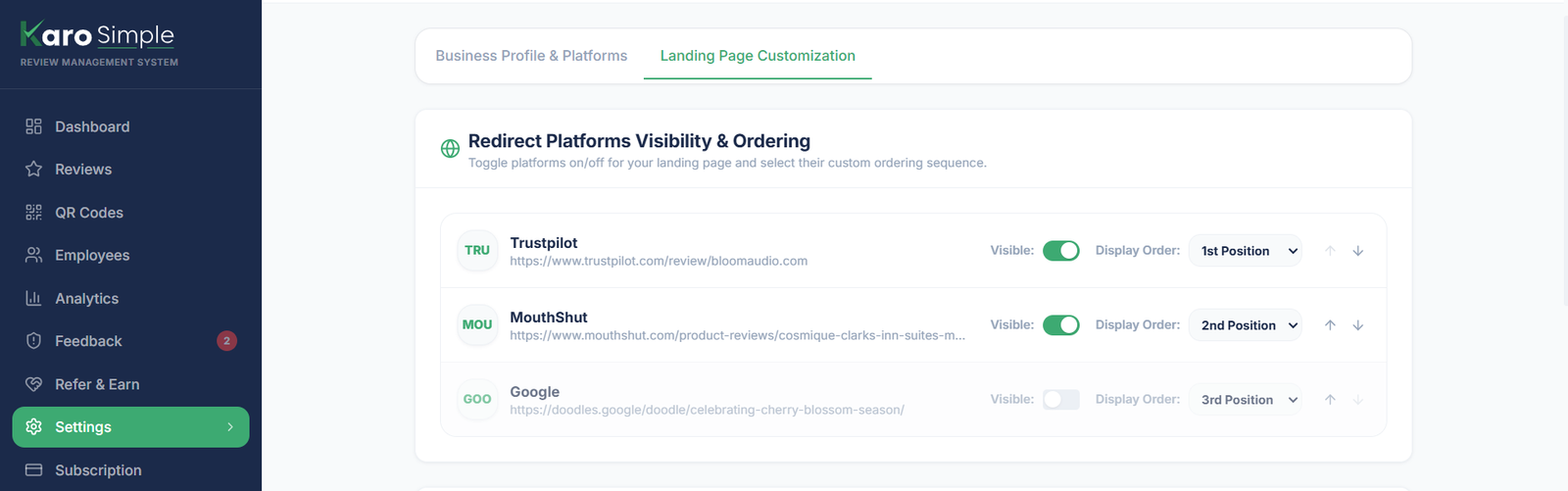
You may have added multiple review links in your account (such as Google, Zomato, Practo, and Facebook). In this section, you decide which of those links customers actually see and in what order:
- Visibility Toggles: Each platform has an on/off switch. Switch it ON to show it to scanning customers, or switch it OFF to temporarily hide it without deleting the link from your account.
- Position Dropdowns & Arrows: Use the position dropdown (1st Position, 2nd Position) or the Up and Down arrow buttons to set the order. Position 1 appears right at the top of your landing page.
- Conflict Warnings: If two active platforms are accidentally assigned the same position number, the system displays a clear warning prompting you to reassign one of them.
Temporary Hiding Real-World Example
Suppose you have Google, Zomato, and Practo connected. If your Practo page recently received an unfair complaint and you want to pause sending new traffic there while you investigate, simply toggle Practo to "Hidden". Customers will only see Google and Zomato, while your Practo link remains safely stored in your account.
#Part 2: Offering 15+ Languages
Customers are far more likely to leave a glowing review when they can read and express feedback in their native language. Karo Simple offers support for 15+ Indian and global languages:
- English, Hindi, Hinglish, Odia, Bengali, Gujarati, Marathi, Telugu, Tamil, Kannada, Malayalam, Punjabi, Urdu, Assamese, Konkani, and Maithili.
Select Your Available Languages
Click on any language button to activate it. It will highlight in green. Click it again to deselect it. Note: At least 1 language must always remain selected.
Set the Default Landing Language
When you have 2 or more languages active, a "Language Display Sequence" list appears below. The language at Position 1 is your default. When customers scan your code, they immediately see reviews in that default language without needing to tap any buttons.
Real-World Localization Strategy
A restaurant in Pune serves traditional Maharashtrian dishes. Management selects English, Hindi, and Marathi, setting Marathi as Position 1. Local diners immediately see warm reviews in Marathi, while out-of-state visitors can switch to Hindi or English with a single tap.

#Plan Tier Allowances for Languages
- Free Plan: English only. Regional languages are locked.
- Starter Plan: English, Hindi, and Hinglish supported.
- Pro & Agency Plans: All 16 regional and global languages unlocked with custom sequence ordering.
#Frequently Asked Questions
Was this guide helpful?
Help us keep our documentation accurate and easy to follow.
Review Length Rotation Mix: Short, Medium & Lengthy Sliders
Configure the relative weights for Short, Medium, and Lengthy review suggestions with real-time percentage bars to match customer reading habits.
Visual Branding, Colors & Layout Templates (Classic, Modern, Minimalist)
Upload your brand logo, set primary and secondary brand colors, select from 3 layout templates, and save all landing page settings at once.