
Generating Smart Reviews with AI
Generate high-converting, realistic reviews using AI in 15+ languages with custom tones, positive and negative keywords, and tailored instructions.
#Why AI-Generated Reviews Supercharge Your Review Collection
Coming up with dozens of varied, authentic-sounding reviews on your own takes hours of mental effort. If you write them yourself, they often end up sounding identical because humans naturally repeat the same phrases.
Karo Simple's built-in AI Review Generator creates diverse, natural-sounding reviews in minutes. You simply tell the AI a few details about your business (such as your specialty services, preferred tone of voice, and keywords you want to rank for on Google) and the AI drafts realistic reviews ready for your customers.
Real-World Example
You own a hair salon in Pune. You instruct the AI to generate 10 friendly, casual reviews in Hindi focusing on your "Keratin Hair Spa" and "Experienced Stylists". In less than a minutes, you have 10 distinct, natural reviews that local customers will happily post.
#Step-by-Step: Setting Up the AI Review Generator
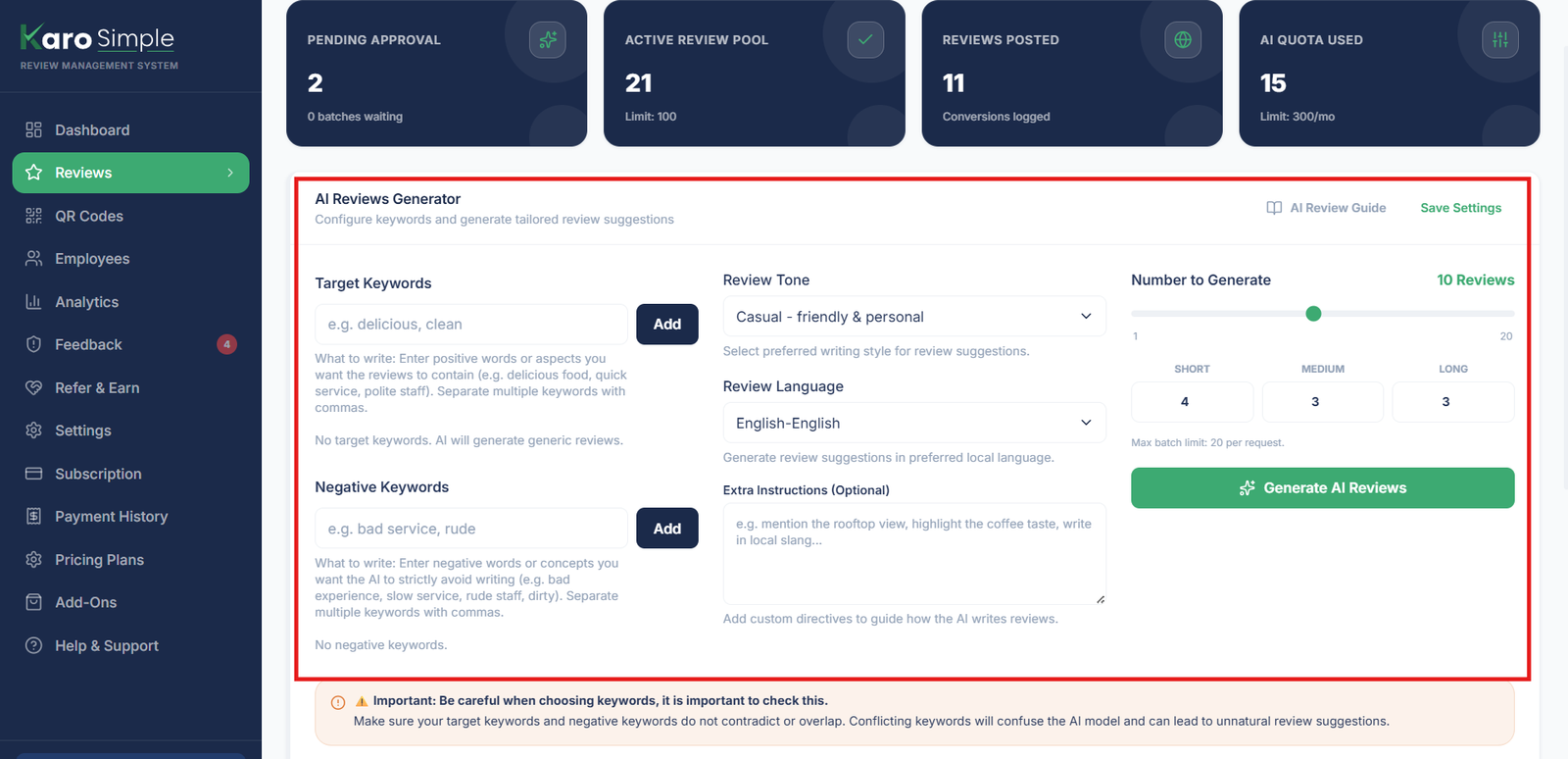
To launch the AI assistant, navigate to the Reviews page and click the prominent "Generate with AI" button. A configuration drawer will open with the following customization options:
Choose Your Review Length Distribution
Different customers have different preferences. Some love copying a quick 1-sentence compliment; others like sharing a detailed story. Choose how many of each you want: • Short (20–40 words): Quick, punchy, mobile-friendly impressions. • Medium (60–90 words): Balanced feedback highlighting 2–3 specific perks. • Lengthy (120–180 words): Rich, story-driven customer experiences that rank exceptionally well on Google Maps SEO.
Select Your Brand Tone of Voice
Pick how the reviews should sound to match your business personality: • Professional: Polished, respectful, and authoritative (great for clinics, law firms, and consultants). • Friendly (Most Popular): Warm, welcoming, and personal, like a friend recommending a favorite spot. • Casual: Laid-back, modern, and colloquial (ideal for cafes, streetwear, and youth brands). • Enthusiastic: High energy, excitement, and exclamation (perfect for bakeries, gyms, and entertainment). • Formal: Traditional, highly polite, and courteous.
Pick Your Preferred Language (15+ Languages Supported)
Customers feel most comfortable expressing praise in their mother tongue. Karo Simple supports 15+ Indian languages: • English • Hindi (हिन्दी) • Hinglish (Hinglish) • Odia (ଓଡ଼ିଆ) • Bengali (বাংলা) • Gujarati (ગુજરાતી) • Marathi (मराठी) • Telugu (తెలుగు) • Tamil (தமிழ்) • Kannada (ಕನ್ನಡ) • Malayalam (മലയാളം) • Punjabi (ਪੰਜਾਬੀ)
Input Positive Keywords (What to Highlight)
Enter phrases and offerings you want the AI to naturally weave into the text. This directly helps your Google Business Profile rank higher in local search results! Examples for a Restaurant: "crispy dosa, filter coffee, clean family dining, fast breakfast service" Examples for an Auto Garage: "transparent pricing, original brake pads, car washed on time, friendly manager" Note: Choosing 2–3 positive reviews and generating them in smaller amounts often produces more unique and natural‑sounding content. Generating too many at once can make reviews feel repetitive. Always update your instructions and business details before writing, so the AI produces accurate, high‑quality reviews that truly represent your brand.
Input Negative Keywords (What to Avoid)
Tell the AI topics or words it should NEVER write about. This ensures the generated reviews align with your current business reality. Examples of Negative Keywords: • If you recently raised prices, add "cheap" or "affordable" as negative keywords. • If you are an appointment-only salon, add "walk-ins" as a negative keyword so customers aren't misled.
Provide Custom Extra Instructions
In the Extra Instructions box, you can give specific background context or rules to the AI. Think of this like a prompt box where you tell the AI exactly what to include or avoid. The AI will follow these instructions while generating reviews, making them more relevant to your business. Examples: “Always mention our convenient free parking behind the building.” “Mention that Dr. Priya explained everything very patiently.” 👉 Tip: Always provide clear, concise instructions. This helps the AI generate reviews that sound unique and authentic. If you don’t guide it, the AI may repeat similar patterns. Keep updating your instructions and business details regularly to ensure reviews stay fresh and accurate.
Click "Generate AI Reviews"
Click the green "Generate" button. The AI processes your request in the background (usually taking 30 to 90 seconds). Once finished, all generated reviews appear under your PENDING list for your review.
Keep Your Business Details Updated
Updating your business details properly is very important because the AI does not have any prior knowledge about your business. If you miss key information, the AI may repeat the same style or generate reviews that don’t match your actual services. To avoid this, always refresh your details, update service patterns, and make changes several times so the AI can rotate and create diverse reviews. In the Instruction box, give clear guidance especially if the AI makes mistakes because detailed input helps it generate accurate content. Remember, the AI relies entirely on the information you provide. Real‑life example: If you only write “restaurant” but your restaurant belongs to the Jain community, the AI might generate reviews mentioning non‑veg dishes. This could negatively impact your business. To prevent this, always provide clear instructions, complete business details, negative keywords, and the proper tone so the reviews are relevant, accurate, and aligned with your audience.
Edit Reviews When Needed
AI can make mistakes, so always check reviews before approving them. If you notice AI makes any mistakes in a review, don’t delete the entire review. You can simply edit the specific part that is wrong and then approve it. This way, you don’t need to regenerate the whole review just adjust the wording to make it accurate and save time.
#
Plan Limits & Features for AI Generation
AI review generation capabilities scale with your Karo Simple subscription tier:
- Free Plan: Generates Short reviews only. Fixed default tone. No positive/negative keywords or extra instructions. Limited to a small monthly batch.
- Starter Plan: Generates Short and Medium reviews. Choose from all 5 brand tones. Includes up to 3 positive/negative keywords. Increased monthly review volume.
- Pro & Agency Plans: Unrestricted access to all review lengths (including detailed Lengthy story reviews), all 15+ languages, positive and negative keywords, custom instructions, and maximum monthly generation limits.
Time-Saving Perk: Automatic Settings Memory
Once you configure your brand tone, primary language, and keywords, Karo Simple remembers your preferences. The next time you generate a batch, all your fields are already filled in, saving you time!
#Frequently Asked Questions
Was this guide helpful?
Help us keep our documentation accurate and easy to follow.
Building Your Review Library: Manual, CSV & Bulk Paste
Learn how the Karo Simple review library works, understand review statuses, and discover 3 fast ways to add reviews: manual writing, CSV import, and instant bulk paste.
Managing, Approving, Moderating & Exporting Reviews
Master review moderation: single and bulk approval, rejecting with reasons, reinstating, editing mistakes, archiving posted reviews, and CSV exports.