

Mastering Viewport Mode & White-Label PDF Client Reports
Step inside any client account with Viewport Mode to manage their QR codes and reviews directly, and download white-label PDF analytics reports.
#What is Viewport Mode?
Agency clients frequently call asking for help: "How do I add a new QR stand for my counter?", "Can you check why my review conversions dropped?", or "Can you approve my pending AI reviews?".
Instead of asking for the client's private password or trying to guide them over the phone, Karo Simple provides Viewport Mode. With a single click, you step inside the client's exact dashboard, viewing and managing their account as if you were the business owner.
#Step-by-Step: Entering and Navigating Viewport Mode
Click the "View" Icon
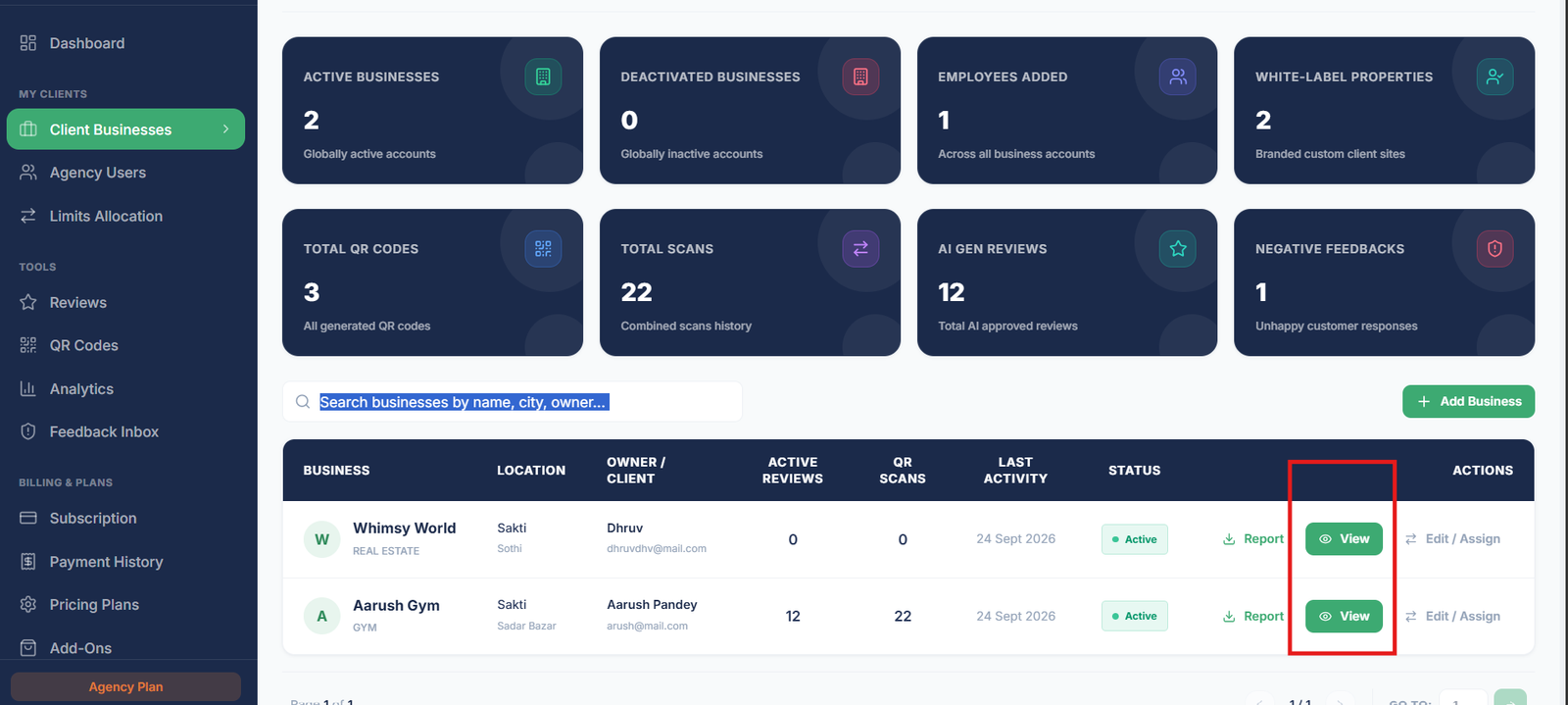
In your Client Businesses table, find the client row and click the blue "View" button (eye icon) on the right.
Context Switches Instantly
The screen refreshes directly into the client's dashboard. Every menu item (Reviews, QR Codes, Analytics, Feedback, Staff, Settings) now operates on that client's isolated data.
Perform Management Tasks
You can generate new AI reviews, reorder platform priorities, download print-ready QR standees, or respond to negative customer feedback on behalf of your client.
Exit Viewport Mode
When finished, locate the persistent viewport banner at the very top of the screen. Click the "Exit Viewport" button to instantly return to your agency directory.
Real-World Viewport Optimization Scenario
Your client Ramesh Dental Clinic reports low review conversions. You click View on their row to enter their account. Inside their Reviews section, you notice their library consists entirely of English reviews, but their clinic operates in a Marathi-speaking neighborhood. You generate 15 localized Marathi reviews and set Marathi as their default landing page language. Within 48 hours, their review conversions double without Dr. Ramesh lifting a finger!

Viewport Mode Support Ticket Restriction
While in Viewport Mode, you cannot raise support tickets on behalf of that client. If a technical issue occurs regarding that specific client account, exit Viewport Mode first to return to your primary agency account, and then submit the ticket citing the client's business name.
#White-Label PDF Analytics Reports for Clients
Retaining marketing clients requires proving tangible return on investment. Karo Simple includes an automated, 1-click white-label PDF reporting engine directly inside your client directory table:
Click the "Report" Download Icon
On any client row, click the "Report" download icon.
Automated PDF Generation
In under 3 seconds, a branded PDF performance report is compiled and downloaded to your computer.
Deliver Monthly Value to Clients
The report includes clean visualizations of total scans, conversion rates, 5-star ratings captured, customer language demographics, and staff leaderboards. Email this to your client at the end of every billing cycle.

The Monthly Reporting Habit
Agency partners who consistently email monthly PDF analytics reports to their clients experience less than 2% annual client churn. Clients love seeing visual proof that your review management service is actively elevating their online reputation.
#Frequently Asked Questions
Was this agency guide helpful?
Help us improve agency workflows and onboarding guides.
Agency Overview KPIs & The Client Directory Table
Explore your agency control room: 8 portfolio-wide KPI summary cards, searching client records, and understanding directory table columns and badges.
Onboarding Client Businesses
Add new client locations, configure AI review keywords, and link or create client login accounts.