

Agency Users Directory: Roles, Metrics & Expiry Tracking
Explore the agency users directory: 5 aggregate user metrics, understanding Client Owner versus Employee roles, and monitoring plan expiry dates.
#Centralized Team & Client Identity Management
While the Client Businesses tab catalogs your physical storefronts and corporate entities, the Agency Users page is your dedicated identity registry. Every person who logs into Karo Simple under your agency (whether they are a retail store principal, a dental clinic manager, or a frontline salon stylist) is cataloged right here.
This centralized directory gives agency operators complete governance over credentials, account lifecycles, and subscription expiry timelines across all client teams.
#Understanding the Two Agency User Roles
Every account under your agency is assigned one of two distinct roles:
- 1. Client Owner (BUSINESS_OWNER): The primary merchant principal. A Client Owner is linked to one or more business profiles. They can log in to view their analytics, approve reviews, download QR codes, or have your agency manage their operations via Viewport Mode.
- 2. Employee (EMPLOYEE): A frontline staff member working at a specific client business. Each employee belongs to exactly one business location. When they log in, they can view their personal review leaderboard standing and individual QR code scan count.
#The 5 Aggregate User Metric Cards
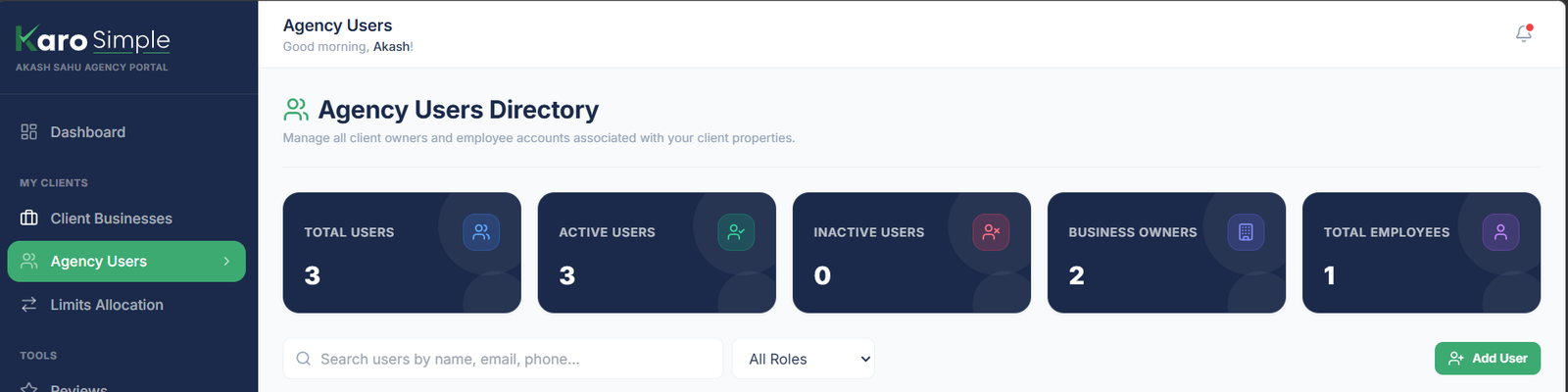
At the top of the directory, 5 KPI cards summarize your agency's entire user base at a glance:
• Total Users: The cumulative count of all client owners and staff accounts currently enrolled.
• Active Users: Accounts that are enabled and can log into the platform normally.
• Inactive Users: Accounts that have been deactivated (e.g. former employees or paused clients).
• Business Owners: Total client principal accounts managing storefronts.
• Total Employees: Total frontline staff members equipped with individual review tracking.
#Reading the Agency Users Directory Table
The directory table displays comprehensive metadata for every registered user account:
- User Profile: The person's full name and their unique 6-character user ID code.
- Contact: Login email address and registered phone number.
- Role: Purple badge for "Client Owner" or green badge for "Employee".
- Linked Business / Property: The specific client storefront connected to this account (or "None Assigned" if not yet linked).
- Expiry Date: For Client Owners, displays when their subscription plan expires (green if active, red if expired). Employees show "No Expiry".
- Created Date & Status: Initial registration date and green "Active" or red "Inactive" status pill.
- Action: The Edit pencil button used to modify details, reset passwords, and toggle active status.

#Instant Search & Role Filtering
Easily navigate through large client rosters using the dual filter controls above the table:
- Universal Search: Type any name, email address, or phone number to filter table rows instantly.
- Role Filter Dropdown: Toggle between "All Roles", "Client Owners" only, or "Employees" only.
#Frequently Asked Questions
Was this agency guide helpful?
Help us improve agency workflows and onboarding guides.
Creating User Accounts & Linking Client Businesses
Learn how to create Client Owner and Employee accounts, set up starting credentials, and link users to their respective business properties.
Password Resets & Client Retention Workflows
Generate secure one-time temporary passwords and proactively manage subscription expiry renewals.