

Pool Enforcement Guardrails & Real-World Agency Scenarios
Master agency allocation rules: over-allocation blocking guardrails, mid-month AI depletion, client staff upgrades, and non-payment suspensions.
#System Enforcement: The Over-Allocation Guardrail
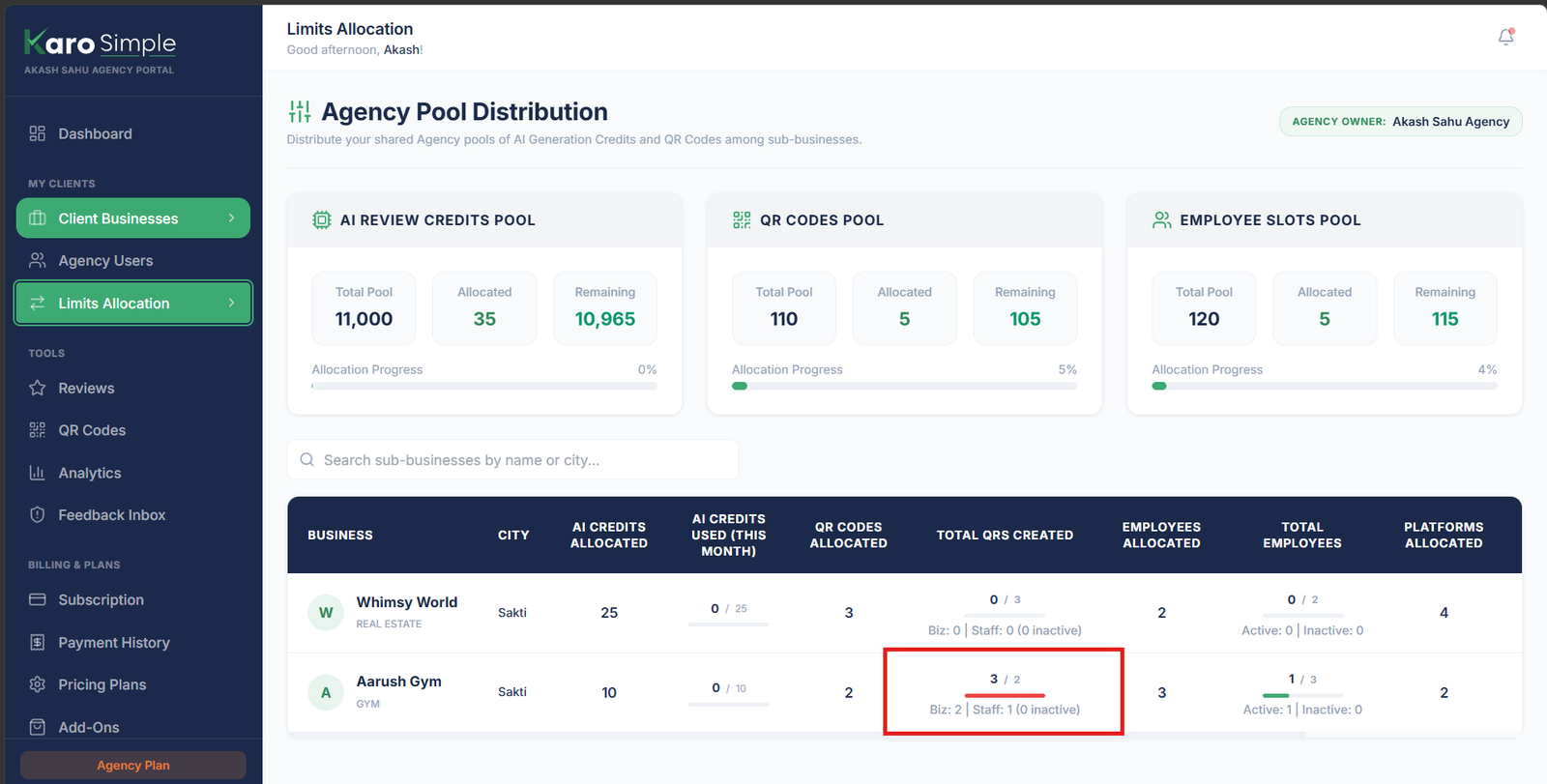
To ensure financial and operational stability, Karo Simple enforces strict mathematical balance on your agency pool. The system checks your pool balance before allowing any allocation edit to save.
If you attempt to assign more resources to a client than your agency pool has remaining, the system displays a clear error modal:
Over-Allocation Error Example
"Cannot allocate 200 AI credits. Remaining agency pool is only 80." When this occurs, you have two simple paths forward: 1. Reclaim Resources: Find an inactive or slow client whose actual usage is low, reduce their limit, and assign the freed resources to your new client. 2. Upgrade Agency Plan: Contact Karo Simple support to expand your master pool.
#5 Real-World Agency Operational Scenarios
#Scenario 1: Onboarding a New Small Business Client
A new cafe signs a Starter agency contract. Standard recommended starting allocation: 50 AI Credits, 5 QR Codes, 3 Employee Slots, and 2 Platform Slots. Set expiry for 1 month (or 3 months if pre-paid). This conserves your pool while giving the client plenty of room to collect reviews.
#Scenario 2: Proactive Renewal on Amber Expiry Badges
You notice an amber badge ("18d left") for a dental clinic client. You send their monthly invoice via email. Once the payment clears, open Edit Limits, select "Extend by N months", enter 1 (or 3), and click Save. The badge immediately returns to green.
#Scenario 3: Client Hires Additional Staff
A restaurant client hires 3 new waiters and needs personal QR codes for staff attribution. Open their Edit Limits, increase Employee Slots from 3 to 6, and save. The client can immediately add their new team members from their mobile dashboard.
#Scenario 4: Mid-Month AI Credit Depletion
A boutique hotel client's AI Credits Used bar is solid red: they generated 50 reviews in the first 10 days of the month. You can either increase their allocation from 50 to 100 to support their campaign, or advise them that their free monthly quota resets on the 1st.
#Scenario 5: Handling Client Non-Payment Suspensions
If a client defaults on their monthly agency retainer, do not delete their business. Instead, manage the suspension cleanly:
Open Edit Limits for the Client
Locate their row and open the Edit Limits modal.
Set Resource Quotas to 0
Reduce AI Credits, QR Codes, and Employee Slots to 0.
Set Expiry to Today's Date
Select "Set specific date" and choose today's date. Save.
- The Result: Their QR landing page pauses, and new reviews cannot be generated. However, 100% of their historical review data, star ratings, and employee lists remain safely preserved. When they settle their invoice, restore their limits and extend their expiry date!
#Agency Best Practice Habits
- First-of-Month Audit: Perform a 5-minute review on the 1st of every month to check for red AI bars or amber expiring accounts. Proactive outreach prevents client emergencies.
- Avoid Upfront Over-Allocation: Do not grant 200 AI credits to a brand-new client who only needs 30. Allocate conservatively and increase limits based on proven demand.
#Frequently Asked Questions
Was this agency guide helpful?
Help us improve agency workflows and onboarding guides.
The 3 Shared Resource Pools & Client Allocation Table
Understand the shared resource pool architecture across AI credits, QR codes, and employee slots, and navigate the client allocation table.
Editing Client Limits, Expiry Badges & Monthly AI Resets
Step-by-step guide to editing client allocations, extending subscription expiries by N months, reading colored expiry badges, and monthly resets.